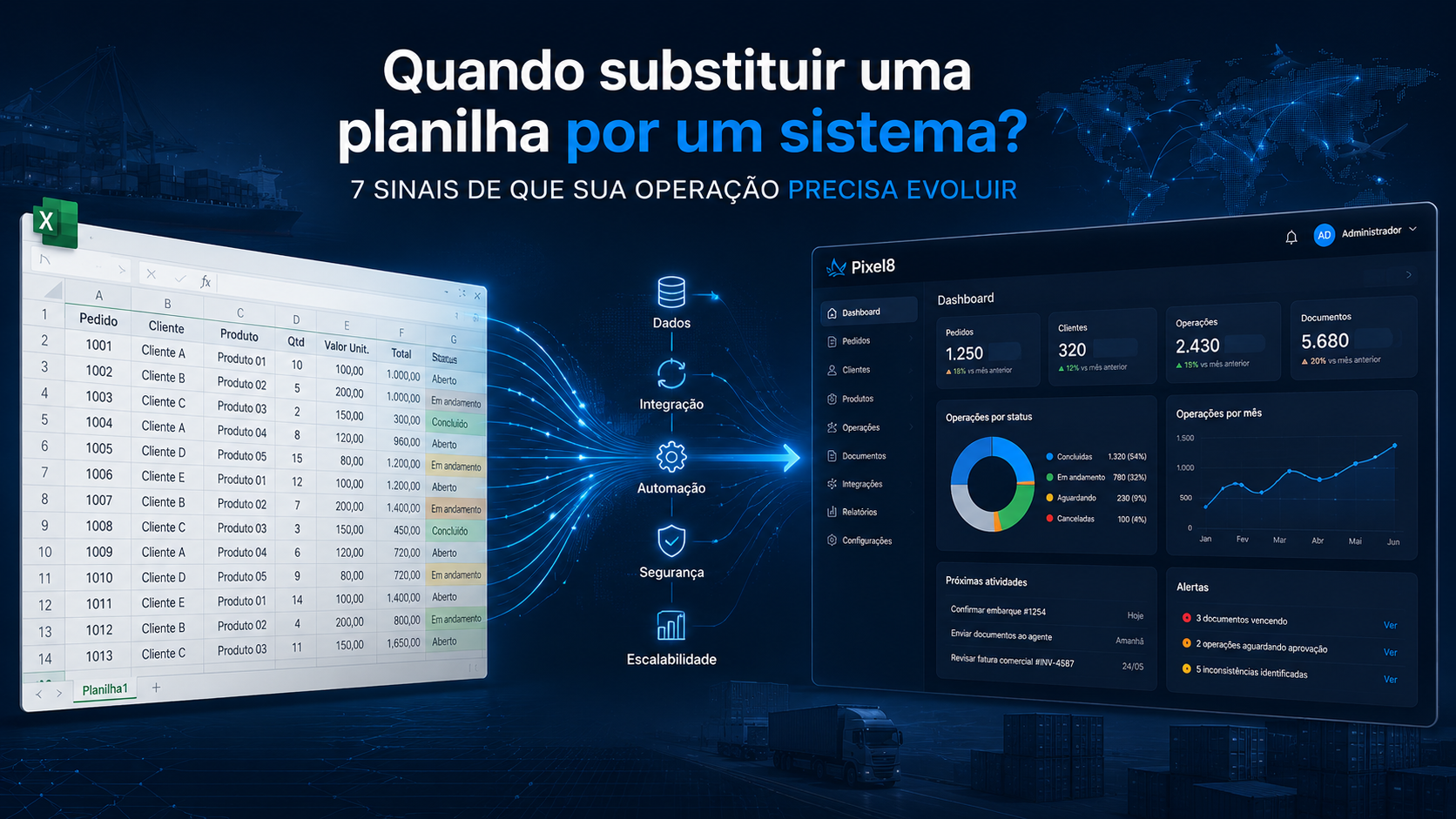
When Should You Replace Spreadsheets with Software? 7 Signs Your Operation Needs to Evolve
Spreadsheets are among the most useful tools in business.
They are fast, flexible, familiar to most teams, and allow companies to create controls without starting a software development project.
A new requirement appears?
Create a spreadsheet.
Need to track information that your current system does not provide?
Add another control.
Need to consolidate data for management?
Create another spreadsheet.
And in many situations, that is exactly the right solution.
The challenge begins when a control created to solve a specific problem grows together with the operation and starts performing a much larger role than originally intended.
Multiple people begin to depend on it.
Information needs to be updated every day.
Data is copied from other systems.
Formulas become increasingly complex.
Reports depend on the file.
Eventually, the spreadsheet becomes essential to the operation.
At this point, an important question arises:
Is it time to replace the spreadsheet with software?
The answer is not always yes.
Before developing a new application, it is important to understand why the spreadsheet exists, which problems it solves, and what the best next step should be.
Spreadsheets are not the problem
There is a tendency to treat spreadsheets as a sign that a company lacks technology.
That view is too simplistic.
Excel and other spreadsheet applications are excellent tools for many situations.
A spreadsheet may be ideal for:
- one-time analysis;
- simulations;
- calculations;
- small operational controls;
- data consolidation;
- process prototyping;
- low-volume operations;
- situations requiring significant flexibility.
Many important business processes started this way.
Someone identified a requirement that the existing software did not support and quickly created a solution.
Finding spreadsheets inside an operation therefore does not necessarily mean finding a problem.
The better question is:
Is the spreadsheet still appropriate for the size and complexity of the process today?
Several signs can help answer that question.
1. Multiple people need to update the same spreadsheet
A spreadsheet used by one person is very different from a control that several professionals need to maintain simultaneously.
As more people become involved, new challenges emerge.
Who can change a specific field?
Who made the last update?
Which information is correct?
Was something accidentally deleted?
Did someone change a formula?
Is everyone using the latest version?
Even with collaborative spreadsheet platforms, there may come a point when the process requires more than shared editing.
The company may need users, responsibilities, workflows, and permissions.
This is one of the first signs that the process may be becoming more like an application than a simple spreadsheet.
2. People copy information from other systems to keep the spreadsheet updated
This is one of the clearest opportunities for technology.
Imagine that certain information already exists in the ERP.
Yet every day, someone opens the ERP, retrieves the data, and copies it into a spreadsheet.
Another piece of information comes from an external platform.
Another comes from a document.
Another arrives by email.
Employees effectively become the integration layer between different information sources.
The spreadsheet itself may not be the problem.
The problem is the manual work required to keep it updated.
In this situation, replacing the spreadsheet may not even be necessary.
An integration could solve much of the problem.
If the systems provide APIs or other ways to access their data, information may be synchronized automatically.
Before considering new software, ask:
Why does someone need to copy information that already exists digitally somewhere else?
3. Multiple spreadsheets control different parts of the same process
A control starts small.
Then a financial spreadsheet appears.
Another one tracks documents.
Another handles operational follow-up.
Another produces KPIs.
Another is created for management.
Over time, several files begin to represent different parts of the same business process.
The challenge appears when someone asks a simple question and nobody knows which spreadsheet contains the correct answer.
Fragmentation creates another risk: different files may represent different moments in the operation.
One spreadsheet has been updated.
Another still contains the previous information.
The team begins spending time not only updating information but also reconciling different versions of reality.
When several spreadsheets together begin functioning like an informal business system, it may be time to consider a centralized data structure.
4. The process depends on formulas that only a few people understand
Spreadsheets can contain an impressive amount of business intelligence.
Formulas.
Macros.
Pivot tables.
Rules.
Connections.
Scripts.
Some spreadsheets evolve for years and eventually contain an important part of the company’s operational knowledge.
But that creates a risk.
What happens if the person who built everything leaves the company?
If only one or two people understand how a critical control works, the organization has created an important dependency.
This does not mean every complex spreadsheet should become software.
However, when essential business rules are hidden inside formulas that are difficult to maintain, it may be worth formalizing those rules elsewhere.
5. The company needs alerts, permissions, and history
Spreadsheets are excellent at storing and manipulating information.
But some processes eventually require behavior that is more typical of a business application.
For example:
Permissions
User A can view certain information, but only User B can change it.
History
The company needs to know who changed a value, when it was changed, and what the previous value was.
Alerts
When a deadline approaches, someone needs to be notified.
Workflow
When one person completes an activity, another stage needs to begin.
Approval
A change must be approved before it becomes effective.
When several requirements like these begin to appear, the problem is no longer simply about storing information.
There is now a business process that needs to be managed.
And business processes usually require more structure.
6. Volume has increased and maintaining the spreadsheet has become a job
What works for 20 operations may not work the same way for 200.
As a company grows, so does the number of:
- processes;
- documents;
- customers;
- suppliers;
- users;
- integrations;
- updates;
- exceptions;
- data points.
A spreadsheet that once took a few minutes to update may begin consuming hours.
Reports become heavier.
Consolidation becomes more difficult.
Follow-up requires increasingly more work.
At this stage, there is an important question:
How much time is your team spending managing the control instead of managing the operation?
When maintaining the tool becomes a significant activity on its own, it is worth evaluating alternatives.
7. The spreadsheet has become business-critical
This may be the most important sign.
Ask:
What happens if this spreadsheet becomes unavailable tomorrow?
If the answer is:
“We cannot operate.”
the situation deserves attention.
A tool that has become critical to the operation may require:
- access control;
- backups;
- history;
- availability;
- security;
- audit trails;
- business rules;
- integrations;
- monitoring.
The more dependent the company becomes on the tool, the more attention should be given to the architecture supporting the process.
This does not automatically mean replacing the spreadsheet.
It means recognizing that the control is no longer just a file.
It has become part of the company’s operational infrastructure.
There are more than two options: Excel or a new system
This is an important point.
When companies identify limitations in a spreadsheet, they often assume there are only two alternatives:
continue using Excel
or
build an entirely new system.
In practice, there are several possible paths.
Option 1: Keep the spreadsheet
If it continues to support the process effectively, there may be no reason to replace it.
Not everything needs to become software.
A good technology decision also involves knowing when not to build something.
Option 2: Automate the spreadsheet
Sometimes the spreadsheet works well, but there are repetitive manual tasks around it.
For example:
- importing files;
- generating reports;
- consolidating information;
- sending notifications;
- updating specific data.
These activities may be automated without abandoning the spreadsheet.
Option 3: Integrate the spreadsheet with other systems
If the biggest problem is manually copying data from other platforms, integration may be the answer.
Information can come automatically from an ERP, CRM, TMS, WMS, or other systems used by the company.
The spreadsheet remains, but much of the work required to maintain it disappears.
Option 4: Turn the process into software
There are situations where a process genuinely exceeds what a spreadsheet can comfortably manage.
This is particularly true when the company needs:
- multiple users;
- permissions;
- workflows;
- approvals;
- history;
- audit trails;
- business rules;
- integrations;
- large volumes of data;
- automation;
- dashboards;
- scalability.
At this stage, developing a dedicated application or adopting an existing software platform may make sense.
Off-the-shelf or custom software?
Even when a spreadsheet is no longer sufficient, custom software development should not automatically be the first conclusion.
First, determine whether an existing platform already solves the problem.
If a mature product supports the process effectively, adopting that software will often be faster and more cost-effective.
Custom software becomes more relevant when the operation has important unique requirements, specific integrations, or strategic needs that existing products cannot adequately support.
The question should not be:
“How do we turn this spreadsheet into software?”
It should be:
“What is the best solution for the process this spreadsheet currently supports?”
That distinction matters.
How do you turn a spreadsheet into software?
When custom development is the right path, the spreadsheet can be an excellent starting point.
It often contains valuable information about how the operation actually works.
Columns represent data.
Formulas represent rules.
Tabs may represent stages.
Colors may represent statuses.
Comments may represent exceptions.
Reports show which information management considers important.
But developing software does not mean simply recreating the spreadsheet inside a web application.
Instead, use the existing control to understand:
- What problem does it solve?
- Who uses it?
- Which information is required?
- Where does the information come from?
- Which business rules exist?
- Which stages make up the process?
- Which activities can be automated?
- Which systems need to be integrated?
- Which information requires history?
- What can be simplified or eliminated?
Only after answering these questions should the solution begin to take shape.
What about international trade operations?
This situation is particularly common in international trade.
Spreadsheets are frequently used to manage:
- imports;
- exports;
- shipments;
- documents;
- costs;
- payments;
- foreign exchange;
- suppliers;
- containers;
- lead times;
- follow-ups;
- KPIs.
Often, these spreadsheets exist because information is distributed across ERP systems, documents, emails, freight forwarders, customs brokers, carriers, and external platforms.
Simply turning a spreadsheet into software therefore may not solve the underlying problem.
The company may need to integrate data sources.
Automate updates.
Process documents.
Create alerts.
Structure workflows.
Or combine several technologies.
The objective should not be to eliminate Excel.
It should be to reduce manual work and improve the flow of information.
Before replacing a spreadsheet, understand why it exists
An important spreadsheet usually tells a story.
It was created because there was a need.
It was adapted as the process changed.
New columns were added when new information became necessary.
New formulas appeared when new rules were introduced.
New tabs were created as the operation grew.
Before replacing it, study it.
The spreadsheet may reveal exactly which gaps the company’s current systems cannot address.
And it may show where there is an opportunity for technological evolution.
Your operation grew. Did your technology keep up?
A tool that worked perfectly several years ago may still work today.
Or it may have quietly become a bottleneck.
The important thing is to periodically evaluate whether the technology remains appropriate for the volume, complexity, and requirements of the operation.
Sometimes the best decision will be to keep the spreadsheet.
Sometimes it will be integration.
Sometimes automation.
And in other situations, developing or adopting a business system will make sense.
The decision starts by understanding the process, not by choosing the technology.
Software, integrations, and automation for international trade
Pixel8 analyzes business processes and develops custom software, integrations, automation, and AI-powered solutions for international trade operations.
Our objective is not to replace a tool simply because it is a spreadsheet.
We seek to understand why that control exists, which limitations have emerged, and which technology can solve the problem in the most appropriate way.
If a spreadsheet has become essential to your operation, it may be showing you exactly where there is an opportunity for technological evolution.
Talk to Pixel8 and tell us how your process works.